
At least 8 characters, one uppercase letter, one number, one special character, a hieroglyph, a musical note and the blood of a unicorn. Sounds familiar; we’ve all wrestled with ridiculous requirements when creating a password. Why all the fuss?
The human mind evolved to find patterns in a noisy universe. It’s as simple as this: if I write :), you’ll see a smiling face, even though it’s just a colon and a curved line. You found a pattern where there were only two characters. And it works the other way round too; if I ask you to make something up, chances are you’ll give it a pattern as well.
Your signature surely has a pattern. You know which strokes to make and in what order, and that’s why it comes out similar every time. Now try to make a completely random signature. You’ll most likely end up zigzagging your hand and drawing circles, almost always in the same direction.
As we saw in the previous post, security depends on things that are unpredictable and hard to guess. Humans tend to produce the opposite. We need to remember our password, so we have to make it memorable. We use our date of birth, our pet’s name, our favourite artist’s name or, worse still, words like password.
That’s why, in the early 2000s, in a desperate attempt to prevent it, cybersecurity experts decided to require rules that add complexity, such as uppercase letters, numbers and symbols. They knew hackers would try the obvious first, so a more complex password would be harder to hit.
One word isn’t enough
Let’s start with a one-word password. The second edition of the Oxford dictionary has entries for 171,476 words in current use in English. A native speaker knows far fewer, about 42,000 according to a 2016 study, and in conversation about 3,000 word families cover more than 95% of what they say, according to the linguist Paul Nation. For our calculations we’ll use the 2,048 most common ones. It’s a round number for a computer, because 2,048 = 211, so each word on the list can be identified with an 11-bit number.
How long does a computer take to try them? In 2026, Hive Systems, a cybersecurity company, rented 16 RTX 5090 graphics cards and measured 138,675 attempts per second against passwords stored with bcrypt, one of those deliberately slow algorithms from last time.[1]
171,476 words   ≈ 1.2 seconds
 42,000 words   ≈ 0.3 seconds
  2,048 words   ≈ 0.01 seconds
Now let’s require at least one uppercase letter, one number and one special character. In practice, most people put the capital at the start and the number and symbol at the end, so the count looks like this.
uppercase   always at the start          1
number      digits 0 to 9               10
symbol      keyboard symbols            32
order       number or symbol first       2

1 × 10 × 32 × 2 = 640 per word
2,048 × 640 = 1,310,720   ≈ 9 seconds
All those rules turned a password that fell in 0.01 seconds into one that falls in 9. That’s 640 times longer, but for someone who wants into your account, waiting 9 seconds makes no difference at all.
Mind you, that’s with Hive’s modern computer. In 2004, when NIST, the US standards institute, proposed in its authentication guideline mixing lowercase, uppercase and symbols, a Pentium 4 of the time tried about 10,000 passwords per second against md5crypt, the password hash used by many systems back then.
1,310,720 ÷ 10,000 per second ≈ 2 minutes
Not even then were they an obstacle; a home computer needed a couple of minutes.
Long beats weird
We’ve seen how much complexity helps. What about length? If we stick with our list of 2,048 words, each word you add multiplies the combinations by 2,048.

1 word    2,048                                 ≈ 0.01 s
2 words   2,048^2 ≈ 4.2 × 10^6   (7 digits)     ≈ 30 seconds
3 words   2,048^3 ≈ 8.6 × 10^9   (10 digits)    ≈ 17 hours
4 words   2,048^4 ≈ 1.8 × 10^13  (14 digits)    ≈ 4 years
For an attacker, waiting 30 seconds is nothing. Waiting 17 hours already takes commitment. But waiting 4 years only makes sense if they really need that password, and in all that time they could look for a more effective way to get what they want.
Three words in plain lowercase already hold out longer than a single word with an uppercase letter, a number and a special character. The uppercase letter, the number and the symbol make the base bigger; adding words makes the exponent bigger, and the exponent changes the result far more.
As you can see, a long password is safer than a complex one, and that’s why current standards no longer require uppercase letters, numbers or symbols. Since 2017, NIST has advised against requiring those mixtures, and since 2025 it forbids making them mandatory. What it asks for now is length, at least 15 characters if the password is the only thing protecting the account.
In 2011, the comic xkcd #936 compared exactly that, a complex password against a long one. It measured them in bits, the way the size of a key is measured; each bit you add doubles the combinations.
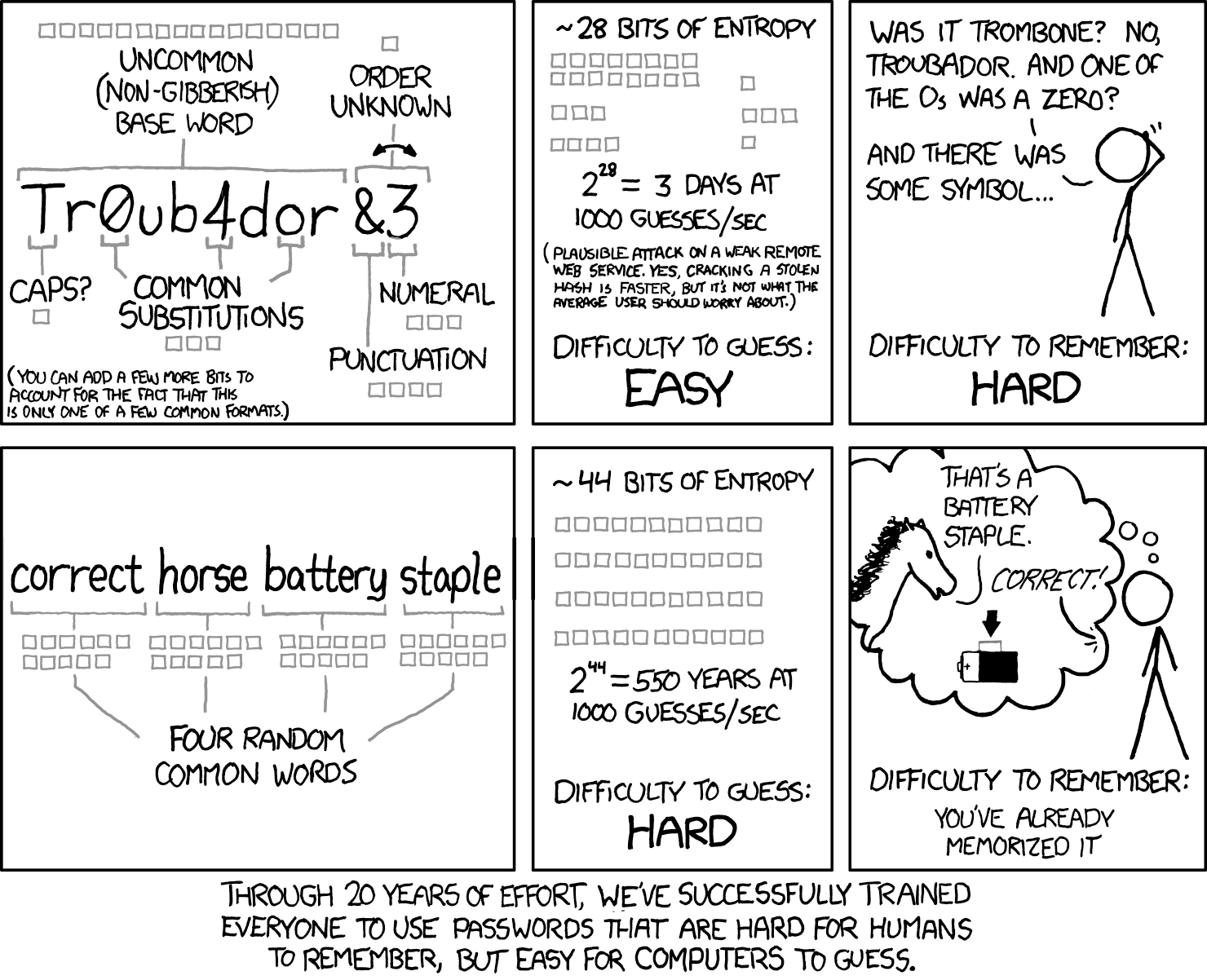
Comic by Randall Munroe, xkcd #936, under a CC BY-NC 2.5 licence.
The first one, Tr0ub4dor&3, looks random, but it’s built the way a person would build it, from Troubador, an English word, and a few predictable tricks. Randall Munroe gives that word 16 bits, as if it came from a list of about 65,000 uncommon words (216 = 65,536).
base word       Troubador   16 bits
uppercase       T            1 bit
substitutions   0  4         3 bits
symbol          &            4 bits
number          3            3 bits
order           &3           1 bit
                           ────────
                            28 bits
That’s 268 million possibilities, about 32 minutes on Hive’s machine.
The comic’s second password is four English words.
correct horse battery staple
We’ve already worked this one out. The comic gives each word 11 bits, the same as a word from our list of 2,048, because 2,048 = 211.
correct   horse   battery   staple
  11    +  11   +   11    +   11    = 44 bits
on Hive's machine        ≈ 4 years
Four years might sound like a lot, but computers get better. We saw that the word with an uppercase letter, a number and a symbol went from 2 minutes in 2004 to 9 seconds today, about 14 times faster. If that jump happens again over the next 20 years, those 4 years would drop to about 3.5 months.
It grows very fast with more words; the Electronic Frontier Foundation recommends six from a list of 7,776, which at Hive’s speed would hold out for about 50 billion years, as long as the words are picked at random. But what if, instead of words, they were 28 typeable characters picked at random, the same number the phrase has?
correct   horse   battery   staple
   7    +   5   +    7    +   6     = 25 letters
                       + 3 spaces   = 28 characters

26 lowercase + 26 uppercase
+ 10 digits + 32 symbols + 1 space
= 95 characters ≈ 6.57 bits each

28 × 6.57 ≈ 184 bits
on Hive's machine        ≈ 5 × 10^42 years (43 digits)
That’s 140 more bits, about 1.4 × 1042 times more combinations, a 43-digit number. And what if they were completely random bits, without limiting ourselves to what can be typed? A computer stores each character in an 8-bit byte.
28 characters × 8 bits = 224 bits
on Hive's machine        ≈ 6 × 10^54 years (55 digits)
Another 40 bits, a trillion times more. In these two cases, not even a computer 14 times faster changes anything; both times are still far longer than the age of the universe, about 13.8 billion years.
Let the computer make it up
A long phrase is safe, but how many do we need? According to NordPass, in 2026 a person handles about 120 personal passwords and 67 work ones. They should all be different. Remember Telcel, the Mexican phone company, sending me my password in plain text? If you reuse passwords, it only takes one service making a mistake like that for the attacker to get into all your accounts.
Who can remember 120 different phrases? We know we can remember film dialogue, poems and song lyrics, but we remember them because they have a pattern and because we repeat them. You’ve heard your favourite song hundreds of times, but you don’t type a password that often, unless you’re a Linux user typing it into the terminal every time you run sudo.
That’s why a password manager is worth it. It keeps all your passwords and you only have to remember one, the manager’s.
And if the manager remembers it for you, why store phrases that are easy to remember? We’ve seen that random characters are much safer than a phrase; the problem was that we couldn’t remember them. So the best way to make the most of a manager is to let it generate completely random passwords, however unmemorable they are.
Every day you use completely random 128- or 256-bit keys, and you didn’t choose a single one. To give you an idea, compare them with typeable characters.
128 bits   2^128 ≈ 3.4 × 10^38 (39 digits)
           95^20 ≈ 3.6 × 10^39 (40 digits)   →  20 characters

256 bits   2^256 ≈ 1.2 × 10^77 (78 digits)
           95^39 ≈ 1.4 × 10^77 (78 digits)   →  39 characters
You’d have to type 20 or 39 random characters to match them.
When you visit a site over HTTPS, your browser and the server agree between them on a 128- or 256-bit key. It’s different from the one used by every other browser connected to the same server, and each connection starts a new one.[2] If someone intercepts the data along the way, they’d have to guess that key. Even if Hive’s machine switched to trying keys instead of passwords, a 128-bit one would take it about 700 million times the age of the universe, and a 256-bit one more than 1047 times.[3]
When you connect to a WPA2 Wi-Fi network, maybe you typed a password, scanned a QR code or pressed the WPS button. But that password isn’t the one that encrypts your messages. When connecting, your device and the router each pick a random 256-bit number and, with those and the password, work out a 128-bit key just for the two of them.[4] The other devices on the network have the same password, but not that key.
When you restart your phone, it asks for your 6-digit PIN before letting you use your fingerprint or face. Those digits aren’t the key that encrypts your data. On a modern phone, your PIN is combined with a random key burned into that phone’s security chip, a chip dedicated to cryptography, and that produces the 256-bit key that protects your data.[5] Even if someone copied all your data to another computer, they couldn’t decrypt it with the PIN alone; they’d also need your phone’s security chip, and your phone limits the attempts. We’ll talk more about these keys in another post.
No password
After all this, it’s clear that you shouldn’t even have to be deciding your passwords, and that’s why the trend is to get rid of them. Passkeys follow the same idea. Your device randomly generates a pair of keys, usually 256-bit; the private one stays with you and the site only keeps the public one. To sign in, the site sends a challenge and your device signs it. You’ve surely used them already; it’s when a site shows you a QR code, you scan it with your phone and you’re in, without typing any password.
To use that key, a short PIN, your fingerprint, your face, your phone’s pattern or a physical USB or NFC key is enough. The Windows Hello PIN works the same way; it isn’t checked on any server, it’s used locally in your computer’s security chip, the TPM, to obtain the long key.
Many companies already offer passwordless sign-in. Since 2025, new Microsoft accounts no longer have a password; Google has offered passkeys as the default option since 2023, and in 2026 OpenAI added an advanced security option that removes the password from ChatGPT and replaces it with passkeys or physical keys. They’re all betting on long, automatically generated keys, and to confirm it’s you they use multi-factor authentication, which we’ll cover in the next post.
References
- Oxford Dictionaries. “How many words are there in the English language?” (archived copy, 7 February 2018). https://web.archive.org/web/20180207121017/https://en.oxforddictionaries.com/explore/how-many-words-are-there-in-the-english-language
- Brysbaert, Stevens, Mandera and Keuleers. “How Many Words Do We Know? Practical Estimates of Vocabulary Size Dependent on Word Definition, the Degree of Language Input and the Participant’s Age”. Frontiers in Psychology 7, 1116 (2016). https://pmc.ncbi.nlm.nih.gov/articles/PMC4965448
- Nation, I. S. P. “How Large a Vocabulary Is Needed for Reading and Listening?”. Canadian Modern Language Review 63(1), 59–81 (2006). https://www.wgtn.ac.nz/__data/assets/pdf_file/0018/1626120/2006-How-large-a-vocab.pdf
- Hive Systems. “The 2026 Password Table Is Here: How Fast Can a Hacker Crack Your Password?” (14 July 2026). https://www.hivesystems.com/blog/are-your-passwords-in-the-green
- Burr, Dodson and Polk. NIST SP 800-63: Electronic Authentication Guideline, version 1.0.1 (September 2004). https://csrc.nist.gov/pubs/sp/800/63/upd1/final
- Openwall. “John the Ripper 1.7.1” (announcement with benchmarks, 11 May 2006). https://www.openwall.com/lists/announce/2006/05/11/1
- Tezcan, C. “Optimization of Advanced Encryption Standard on Graphics Processing Units”. IEEE Access 9 (2021). https://open.metu.edu.tr/bitstream/handle/11511/90722/2021-646.pdf
- Planck Collaboration. “Planck 2018 results. VI. Cosmological parameters”. Astronomy & Astrophysics 641, A6 (2020). https://arxiv.org/abs/1807.06209
- Munroe, R. “Password Strength”. xkcd #936 (10 August 2011). Image under a CC BY-NC 2.5 licence. https://xkcd.com/936/
- Bonneau, J. “EFF’s New Wordlists for Random Passphrases”. Electronic Frontier Foundation (19 July 2016). https://www.eff.org/deeplinks/2016/07/new-wordlists-random-passphrases
- NIST. SP 800-63B: Digital Identity Guidelines, Authentication and Lifecycle Management (June 2017). https://pages.nist.gov/800-63-3/sp800-63b.html
- NIST. SP 800-63B-4: Digital Identity Guidelines, Authentication and Authenticator Management (2025). https://pages.nist.gov/800-63-4/sp800-63b.html
- NordPass. “How many passwords does the average person have?” (2026). https://nordpass.com/blog/how-many-passwords-does-average-person-have/
- Rescorla, E. RFC 8446: The Transport Layer Security (TLS) Protocol Version 1.3 (2018). https://www.rfc-editor.org/info/rfc8446
- Frankel, Eydt, Owens and Scarfone. NIST SP 800-97: Establishing Wireless Robust Security Networks, A Guide to IEEE 802.11i (February 2007). https://csrc.nist.gov/pubs/sp/800/97/final
- Apple. Apple Platform Security, sections “Secure Enclave” and “Passcodes and passwords”. https://support.apple.com/guide/security/secure-enclave-sec59b0b31ff/web
- Android Open Source Project. File-based encryption. https://source.android.com/docs/security/features/encryption/file-based
- Microsoft Security Blog. “Pushing passkeys forward: Microsoft’s latest updates for simpler, safer sign-ins” (1 May 2025). https://www.microsoft.com/en-us/security/blog/2025/05/01/pushing-passkeys-forward-microsofts-latest-updates-for-simpler-safer-sign-ins/
- Google. “Passkeys are now enabled by default for Google users” (10 October 2023). https://blog.google/innovation-and-ai/technology/safety-security/passkeys-default-google-accounts/
- OpenAI. “Introducing Advanced Account Security” (30 April 2026). https://openai.com/index/advanced-account-security/
- FIDO Alliance. Passkeys. https://fidoalliance.org/passkeys/
- Microsoft. Windows Hello for Business Frequently Asked Questions. https://learn.microsoft.com/en-us/windows/security/identity-protection/hello-for-business/faq
Our own calculations at that speed, assuming the attacker tries every combination; on average they hit it halfway through. The 2004 times use the 10,106 attempts per second that Openwall published in 2006 for md5crypt on a 3.2 GHz Pentium 4 Xeon. If the site used a fast hash instead of bcrypt, everything falls much faster. ↩︎
RFC 8446: The Transport Layer Security (TLS) Protocol Version 1.3, sections 2 and 7. In TLS 1.3, each connection derives its own keys. https://www.rfc-editor.org/info/rfc8446 ↩︎
Our own estimate. Trying encryption keys doesn’t involve bcrypt, so the speed isn’t the same as Hive’s with passwords. A 2021 study measured about 5.8 billion AES-128 keys per second on an RTX 2070 Super card. An RTX 5090 has about 12 times its computing power, so Hive’s 16 cards would try around a trillion keys per second. With the age of the universe at about 13.8 billion years, 2128 keys would take about 7 × 10⁸ times that age, and 2256 about 2 × 1047 times. ↩︎
NIST SP 800-97, Establishing Wireless Robust Security Networks, A Guide to IEEE 802.11i (2007), section on the WPA2 key hierarchy. https://csrc.nist.gov/pubs/sp/800/97/final ↩︎
Apple, Apple Platform Security, sections “Secure Enclave” and “Passcodes and passwords”, https://support.apple.com/guide/security/secure-enclave-sec59b0b31ff/web and https://support.apple.com/guide/security/passcodes-and-passwords-sec20230a10d/web. Android Open Source Project, File-based encryption, https://source.android.com/docs/security/features/encryption/file-based. ↩︎